Session protection for professionals who can't afford downtime. One click to prevent sleep, monitor your Mac's vitals, and guard long-running work — no Terminal required.
macOS 13+ · Apple Silicon & Intel · Everything Included · No Extra Installs
Runs Locally Zero Telemetry Offline Verification Everything Included Core Protection Stays Free

Real-time protection. Zero clutter.

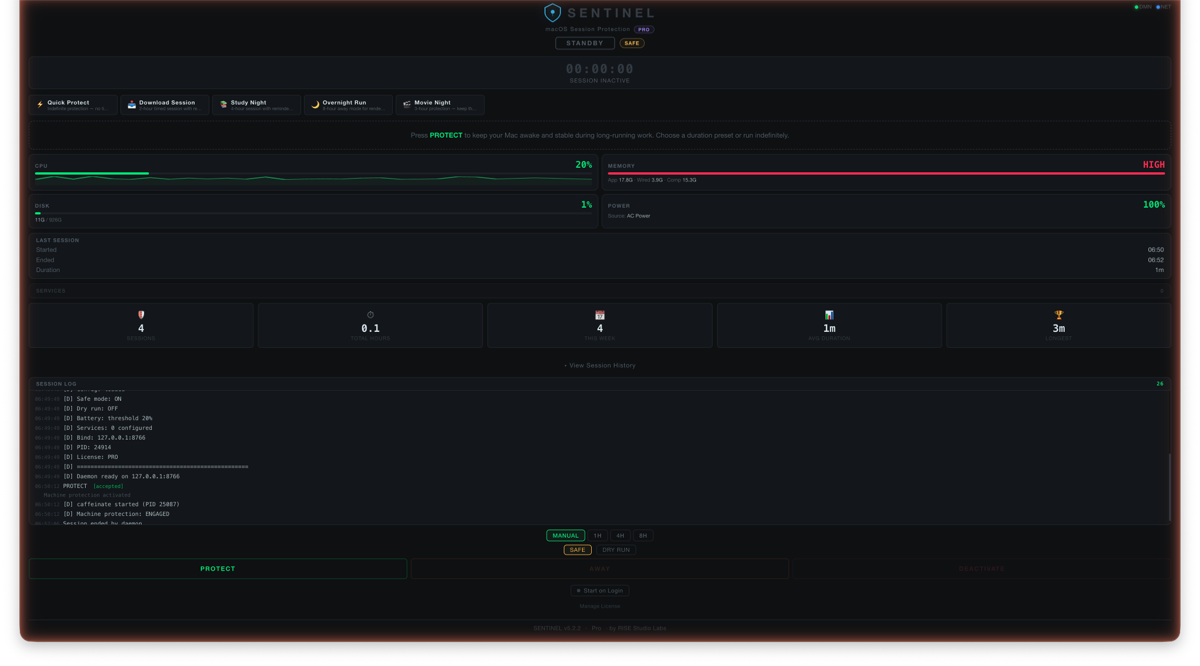
SENTINEL dashboard in standby mode — system monitoring, presets, session log Standby — ready to protect
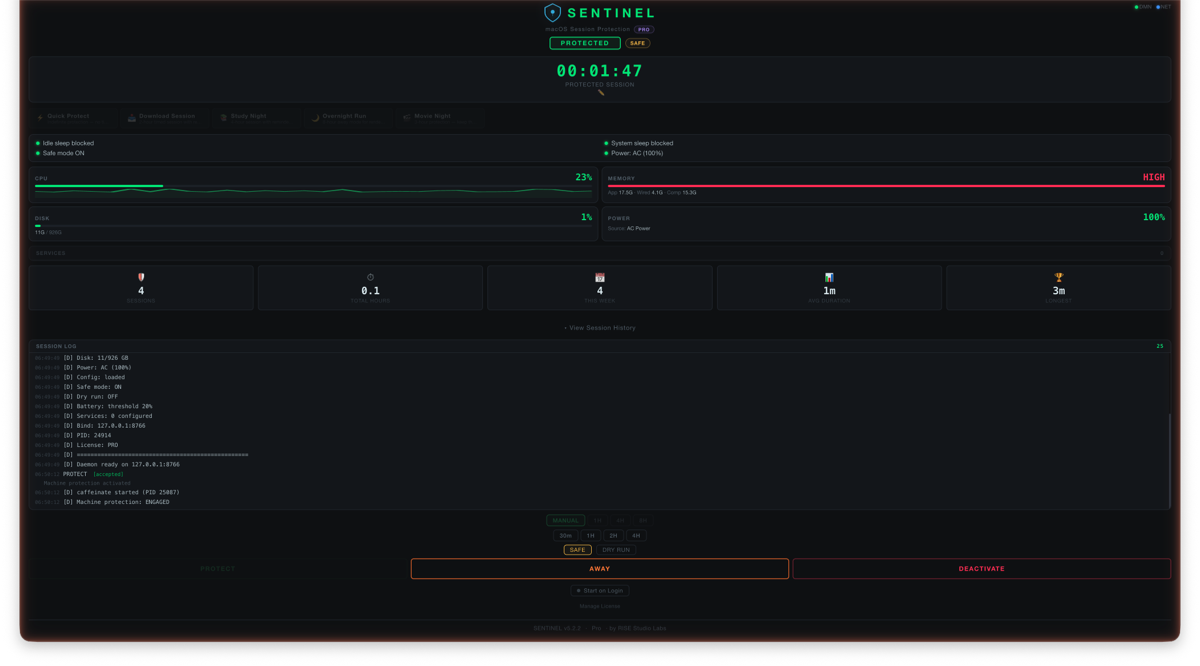
SENTINEL dashboard in protected mode — active session timer, sleep blocked Protected — sleep blocked
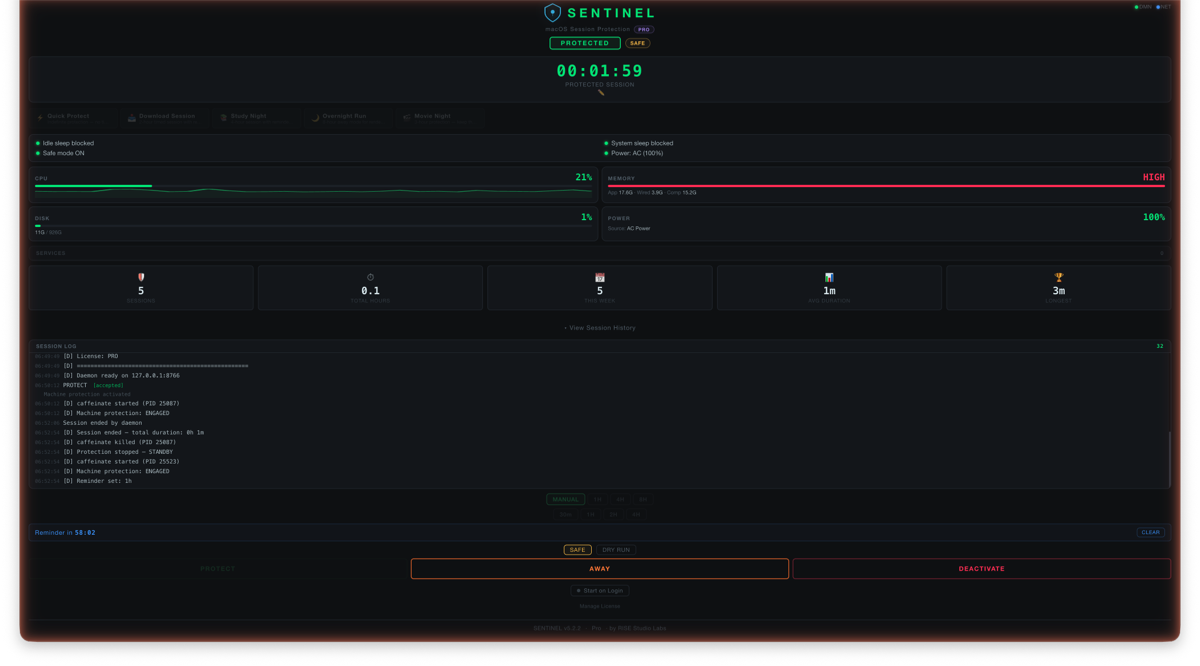
SENTINEL dashboard with Time Guardian reminder active — session timer with countdown Time Guardian — nudge without stopping

Everything your Mac needs
to stay awake and accountable.

Built because typing caffeinate -dimsu in Terminal every time was absurd.

🛡
One-Click Protection
Prevent display sleep, idle sleep, system sleep, and disk sleep with a single button. No Terminal, no flags, no guessing.
📊
Live System Dashboard
Real-time CPU, memory, disk, battery, and network monitoring — all in a beautiful dashboard served locally on your machine.
Timed Sessions
Set a duration and SENTINEL auto-deactivates when done. Perfect for overnight renders, scheduled backups, and known-length tasks.
Time Guardian
Set a reminder that nudges you without killing your session. "Hey — you've been working 2 hours. Time to wrap up?" Snooze or dismiss.
🔌
Connected Services
Monitor local services alongside your session — development servers, AI backends, databases. See what's running and what's not.
🔒
Privacy First
No telemetry, no analytics, no cloud sync. Your data stays on your machine. The only outbound connection is an optional network status check — no data is collected or transmitted.

Running in 30 seconds.

No installers, no setup wizards, no account creation. Just open and protect.

Download
Grab the DMG, drag SENTINEL to Applications. One app, everything included.
Launch
Double-click the app. SENTINEL starts its daemon and opens your dashboard in your default browser. Takes about 2 seconds.
Protect
Click PROTECT. Your Mac will not sleep. Monitor your vitals, set a timer, or just let it run. Click DEACTIVATE when done.

Start free. Upgrade when you're ready.

No credit card required. No trial limits on core features. Protect your Mac today.

Free
$0
Forever
  • One-click session protection
  • Real-time system monitoring
  • Timed sessions with auto-deactivate
  • Away mode
  • Quick Protect preset
  • 1 connected service monitor
  • macOS notifications
  • Basic session history
  • Update checker

Upgrade anytime for Time Guardian, presets, menu bar, and more.

Download Free
Pro — Monthly
$3.99
Low commitment. Best for occasional use.
  • Everything in Pro Lifetime
  • Ongoing updates beyond v5.x
  • Early access to new features
  • Priority email support
  • Cancel anytime
Subscribe — $3.99/mo

🛡 30-day refund policy. No questions asked. Details →

Built by RISE Studio Labs · chase@risestudiolabs.com · Real human support

Built for people who can't afford interrupted work

💻
Developers
Long builds, CI pipelines, local servers
🧠
AI & ML Engineers
Model training, inference, local LLMs
🎬
Creators & Editors
Overnight renders, exports, encoding
📡
Ops & Transfers
Large uploads, backups, sync jobs
🎯
Deep Workers
Focus sessions without interruption

What happens when your Mac sleeps at the wrong time

Your 6-hour render dies at hour 5
Your 40GB upload restarts from zero
Your ML training run loses overnight progress
Your CI pipeline times out and blocks the team
Your backup fails silently and you don't find out for weeks

SENTINEL makes sure none of that happens.

You could just use caffeinate. Here's why people don't.

FeaturecaffeinateSENTINEL
Visual dashboardNoReal-time stats, timer, controls
Timed sessionsManual flagOne-click presets, auto-deactivate
Session remindersNoTime Guardian — nudge without stopping
Battery warningsNoAlerts at threshold
Away modeNoContinue protection while away
Menu bar controlsNoQuick-access from status bar
Session historyNoFull log with stats
Forget to stop itRuns forever silentlyAuto-deactivate + notifications

FAQ

You can — SENTINEL wraps caffeinate under the hood. But SENTINEL gives you a visual dashboard, live system monitoring, timed sessions, reminders, connected service health checks, and one-click control. No memorizing flags, no forgetting to stop it, no Terminal babysitting.
No. Zero telemetry, zero analytics, no cloud sync. The HTTP server runs on 127.0.0.1 (localhost only) — it's not accessible from the network. The only outbound connection is an optional network status check (a single TCP probe that transmits no data). Your data stays on your Mac.
Free gives you full session protection, system monitoring, timed sessions, away mode, Quick Protect preset, 1 connected service, macOS notifications, basic session history, and update checker. Pro adds Time Guardian reminders, 5 session presets, custom presets, menu bar quick-toggle, unlimited connected services, full session history, named sessions, auto-start on login, and all future v5.x updates. Core protection is always free — no artificial limits on the thing you need most.
SENTINEL uses Ed25519 cryptographic signatures — the same algorithm used by SSH, Signal, and WireGuard. License keys are verified offline using a public key embedded in the app. No server calls, no DRM, no internet required to activate.
Yes. SENTINEL supports both Apple Silicon and Intel Macs natively. Tested on M1, M2, M3, M4, and Intel x86_64. Requires macOS 13 (Ventura) or later.
Time Guardian is a reminder system that nudges you after a set duration — without stopping your protected session. Set a 2-hour reminder, and SENTINEL sends a macOS notification when time's up. Snooze for 30 more minutes or dismiss. Your session keeps running. Perfect for anyone who loses track of time during deep work.
No. SENTINEL includes everything it needs. Just download, drag to Applications, and launch. No extra installs required.
Because SENTINEL is distributed directly outside the App Store, macOS Gatekeeper will block it on first launch. Here's how to allow it: (1) Double-click SENTINEL.app — macOS will show a warning. Click Done. (2) Open System Settings → Privacy & Security. (3) Scroll down — you'll see "SENTINEL was blocked." Click Open Anyway. (4) Enter your password when prompted. This only happens once. After approving, SENTINEL opens normally every time.
To completely remove SENTINEL from your Mac: (1) Quit SENTINEL — deactivate any active session first, then close the app. (2) Delete Sentinel.app from your Applications folder (or wherever you installed it). (3) Remove settings and data (optional): open Terminal and run rm -rf ~/.sentinel. (4) Remove auto-start if enabled: rm ~/Library/LaunchAgents/com.risestudiolabs.sentinel.plist. Your license key remains valid and can be reactivated on a fresh install.
Just paste your license key on the new Mac — your key is intended for personal use across your own machines. You can optionally deactivate on the old Mac first via the dashboard, but it's not required.

Your Mac never sleeps on the job.

Download SENTINEL free. Protect your first session in under 30 seconds.

v5.3.0 · macOS 13+ · Privacy-first · Everything included